


Back in January 2022, I published a script to check indexing status in bulk using Google’s then-new URL Inspection API endpoint. It was very much an MVP. A single index.js file that read a CSV, called the API, and dumped results into a folder. It did the job, but let’s be honest… It was scrappy.
Four years later, that repo has been one of the things I kept meaning to revisit. I’ve learned a few more things in the meantime and I know some people wanted to use it but didn’t feel comfortable with the terminal.
So I finally sat down and did two things: rewrote the CLI from scratch and built a free web app so anyone can check their Google indexing status without touching a terminal.
The web app: no setup, no terminal, no barriers
Let me start with the part most of you will care about.
Free Google Index Checker Tool
It’s live, it’s free, and it runs entirely in your browser.
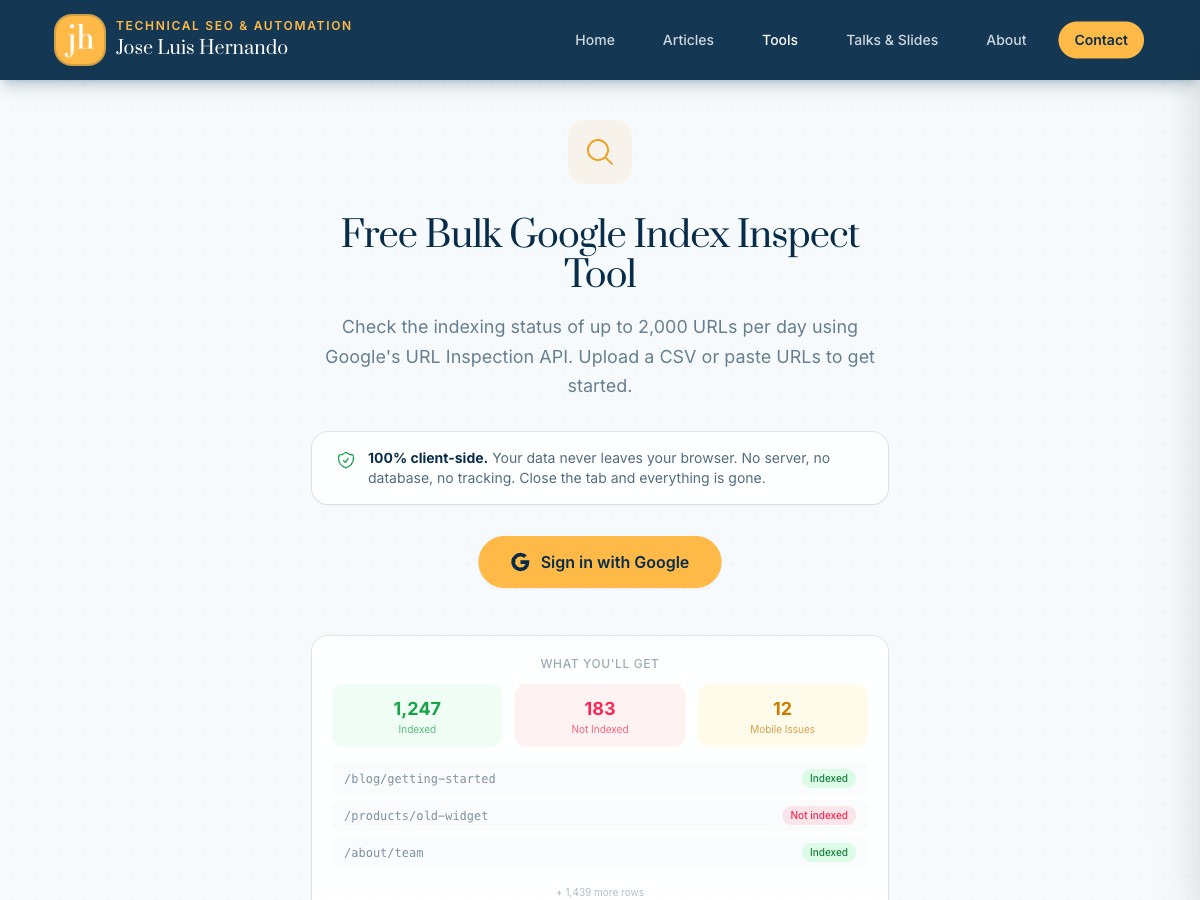
The flow is dead simple:
- Sign in with Google with the same account you use for Search Console.
- Upload your URLs + property in a CSV or pasting them directly.
- See or Download your results as Excel, CSV, or JSON
That’s it. No Node.js, no cloning repos, no npm install, no OAuth credentials to set up. You sign in, upload your URLs, and get your indexing data back.
Your data stays in your browser
This was important to me. The webapp is 100% client-side. Your URLs, your Google credentials, your results… none of it touches a server. The API calls happen directly from your browser to Google’s servers. No database, no tracking, no server logs.
Who is this for?
If you work in SEO and need to check whether Google has indexed a batch of URLs (after a migration, a new section launch, or just a routine audit) this is for you. Especially if the idea of opening a terminal makes you uncomfortable. No judgement, I get it. Not everyone needs to be a command-line person.
You still get the same 2,000 URL daily limit from Google’s API (bummer), but at least the setup barrier is gone.
It ended up with way more features than I expected
What started as a simple “upload, inspect, download” tool kept growing. Once I had the basics working, I kept thinking “what would actually make this useful day to day?” and adding things.
When you sign in, the app pulls your Search Console properties automatically, so if you’re pasting URLs manually you just pick the property from a dropdown instead of typing out sc-domain:example.com or whatever format Google expects. Small thing, but it removes a bit of friction.
While the inspection runs, you get a progress bar with an ETA and a live count of indexed vs not-indexed URLs. You can pause, resume, or hit Esc to cancel if something looks off. And if your browser crashes mid-run (it happens), the app checkpoints your progress locally. Next time you open it, it asks if you want to pick up where you left off instead of starting from scratch.
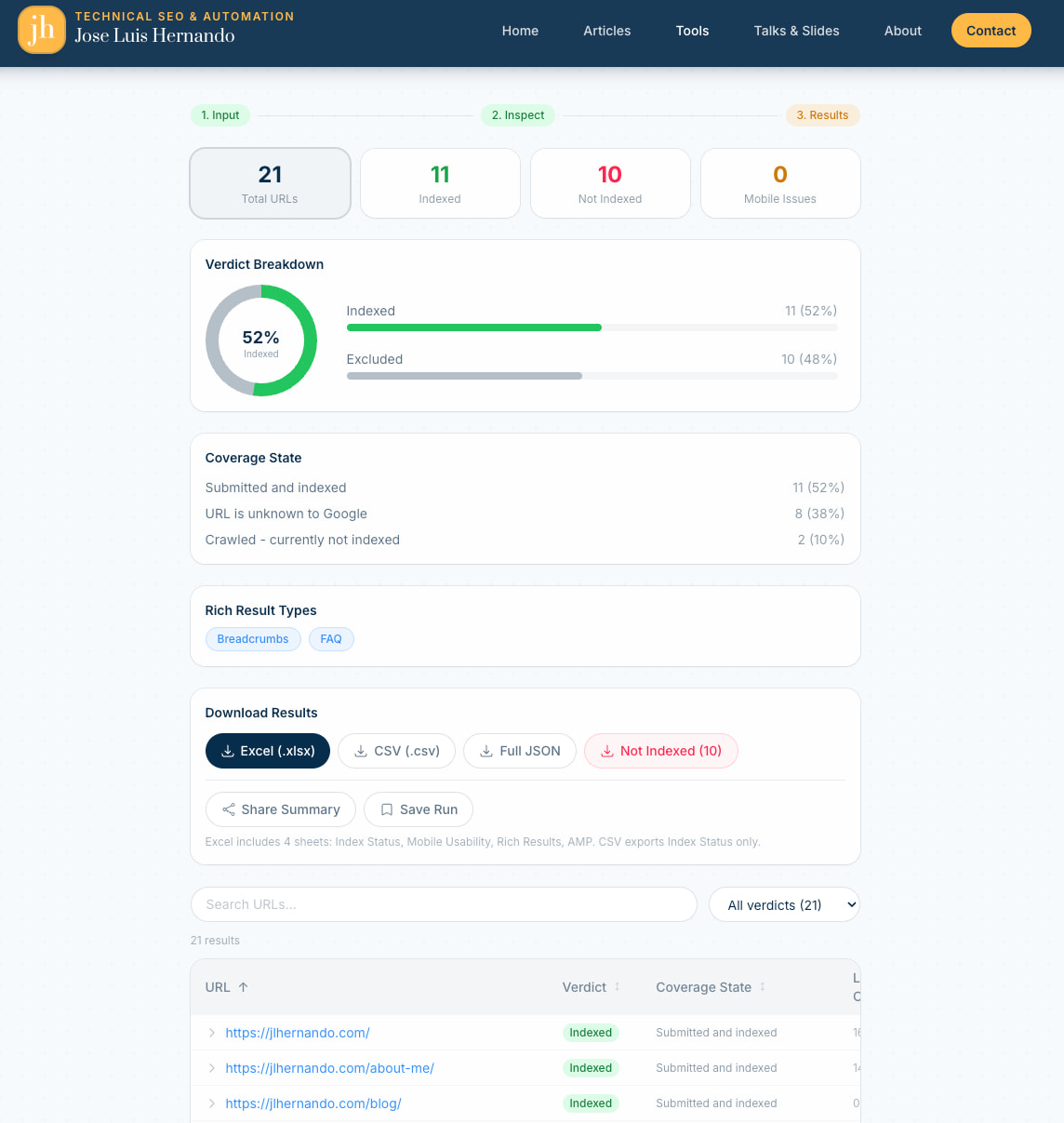
The results page is where I spent the most time. There’s a donut chart and summary cards at the top showing the breakdown by verdict. You can click any card to filter the table instantly.
Each row expands to show the full index inspection response: coverage state, last crawl time, robots status, canonical URL, the lot. And if you just want the problem URLs, there’s a one-click download that exports only the not-indexed ones.
Two features I’m particularly happy with: you can generate a shareable summary link that encodes the aggregate stats (no raw URLs) so you can send it to a client without exposing the full data. And you can save runs and compare them side by side to see which URLs gained or lost indexing between inspections. Really useful after you’ve submitted fixes and want to check progress a week later.
The CLI rewrite: from MVP to proper tool
For those of you who do live in the terminal, the CLI version also got a complete rewrite.
The original was a single file. It worked, but it was simple and fragile.
Here’s what the v2 looks like:
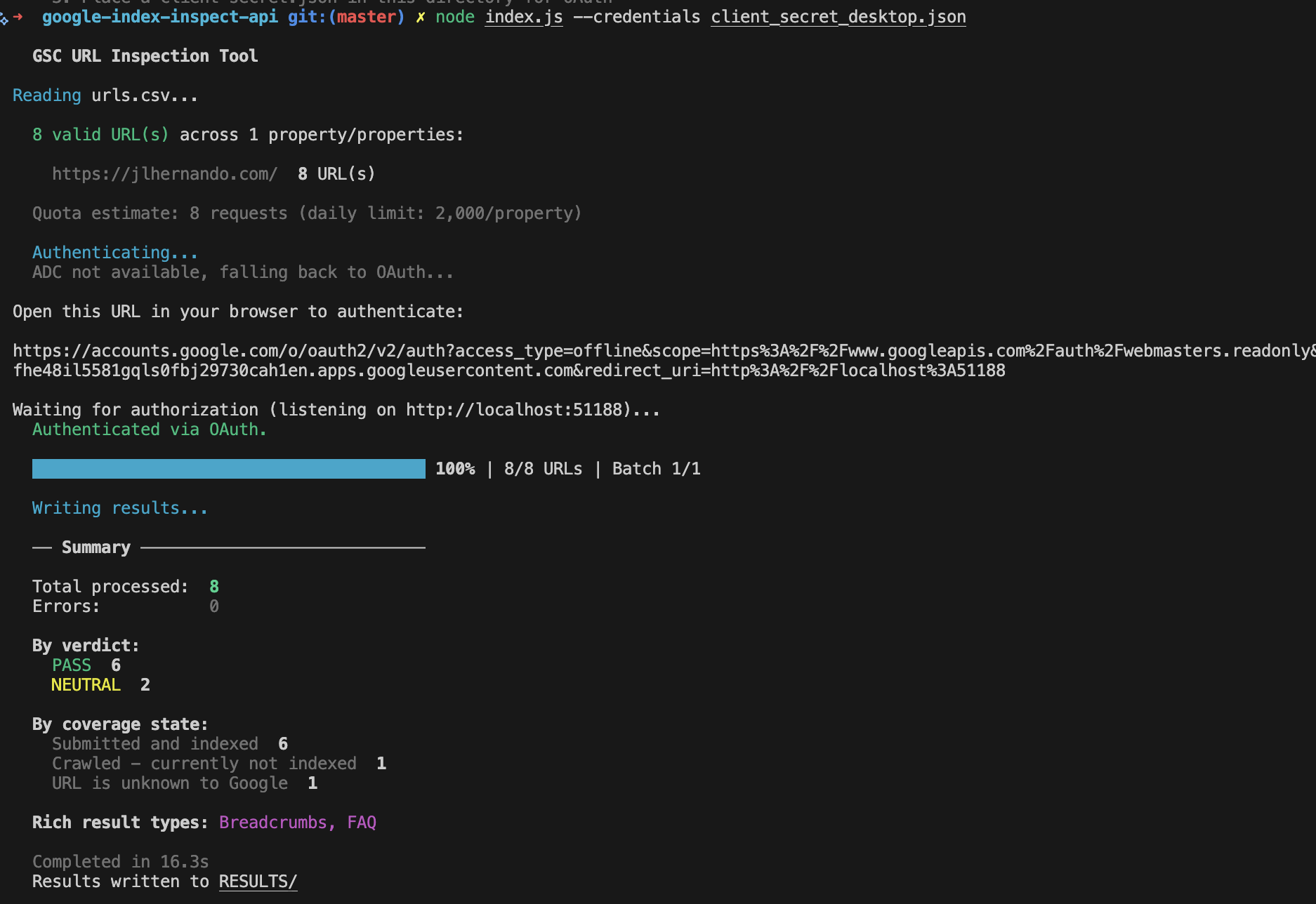
What changed vs the 2022 version
The single-file script is now a proper modular project. Auth, rate limiting, validation, output formatting, and checkpoint management all live in their own files under src/.
Authentication was one of the biggest upgrades. The original only supported OAuth with a web flow, which meant setting up redirect URIs and dealing with Google Cloud Console. Now there are three options: OAuth with a desktop app (recommended, simplest setup), Application Default Credentials (if you already use gcloud CLI), and service accounts (for CI/CD pipelines or cron jobs).
The tool is also much more resilient now. When the API returns a 429 or a 5xx, it retries automatically with exponential backoff instead of just crashing. A token bucket system enforces the 600 requests per minute per property limit, so you don’t have to worry about hitting quotas yourself. And if a run gets interrupted (laptop dies, connection drops) you can pick up where you left off with --resume instead of reprocessing everything from scratch.
Beyond the basic coverage CSV, v2 generates separate reports for mobile usability, rich results, and AMP status. The raw JSON is saved too. It validates your input before making any API calls and gives clear error messages if something’s off. There’s a --dry-run mode to check everything without burning quota, and you can filter output with --only-not-indexed or --filter-verdict FAIL to focus on the URLs that actually need attention.
Quick start
# Clone and install
git clone https://github.com/jlhernando/google-index-inspect-api.git
cd google-index-inspect-api
npm install

# Run with your OAuth credentials (see README for setup)
node index.js --credentials client-secret.json

# Or customise
node index.js --credentials client-secret.json --input my-urls.csv --output my-results --batch-size 10

# Resume an interrupted run
node index.js --resume

# Dry run to validate without API calls
node index.js --dry-run
The full list of options is in the README.
The Claude Code acknowledgement
I want to be transparent about something: I used Claude Code extensively for this rewrite. If you’ve read my previous post about Claude Code and Apps Script, you know I’ve been integrating it into my workflow.
The original 2022 script was entirely mine, written by hand, bugs 🐞 and all. For the v2, I used Claude Code as a pair programming partner. I directed the architecture, decided what features to build, and reviewed every change. Claude helped me write the actual code much faster than I could have alone.
Looking at the commit history, you can see it clearly. The repo went from a single initial commit in 2022 to a full modular rewrite in a single session. For me, absolutely mind bending how this is possible. Pure magic.
Try it out
If you want the quick, zero-setup experience: use the web app. Sign in with Google, upload your URLs, and download the results.
If you prefer the terminal or need it for automation: grab the CLI from GitHub.
Either way, I’d love to hear if it’s useful. Find me on X @jlhernando or LinkedIn.
Get notified when I publish new tools, scripts, and articles.
No spam. Unsubscribe anytime.